


Canadians wondering what a T1 General form is can breathe easy because it's not as technical as it sounds. A T1 General form is the main document used to show your income when filing your personal income tax return. You’ll list all of your income from jobs, self-employment, and pension, so the Canada Revenue Agency (CRA) can determine whether you owe taxes or qualify for a refund.
You can also use the T1 General Form as proof of income when applying for financial products.
If you’re filing your taxes using tax prep software , the service should walk you through filling out the T1 General form. But if you’re filing your taxes yourself, this article explains how to find this form and shows you what it looks like.
Key Takeaways
- A T1 General Form contains information about your income, deductions, tax credits, and more.
- You may need a T1 General Form when applying for tax benefits or credits, mortgages, or major sources of credit.
- You can request a copy of your T1 General Form through your CRA My Account.
Who should fill out a T1 General Form?
The T1 General Form's purpose is to calculate how much you owe (or are owed) on your taxes for the current tax year. If you’re an individual who earns income in Canada, you need to fill out the T1 General Form. This includes people who work for a company, are self-employed, or receive income from sources like pensions or investments.
If you own a business, you’ll need to fill out the T1 Business Form. If you’re filing as a corporation, you should fill out Form T2125.
Other reasons you may need a T1 General Form
Beyond using it to file taxes, you may need a copy of your T1 General Form for certain applications, including these:
- The Canada Child Benefit
- GST/HST tax credits
- Mortgages
- Other major sources of credit
You may also need a copy of your T1 if you're involved in court proceedings that involve child or spousal support. In such cases, though, the proof-of-income statement provided by the CRA should suffice.
How to find your T1 General online
If you're looking for a blank copy of the T1 General Form, visit the CRA’s T1 income package page. From here, you can download a digital copy of the form – but if you'd prefer to have a physical copy of the form mailed to you, you can request it through that link. You can also opt for alternate forms, like braille, audio, or large print formats.
Just keep in mind that you don't usually need to fill out the T1 form manually. If you use tax software, it will automatically provide the form AND fill it out for you in most cases.
How to find last year's T1 General form
To find your form from last year, either log into your CRA My Account or use your tax software. To find a previous year’s T1 General Form on CRA My Account, follow these steps:
- Log into the My Account for Individuals page
- Click on "Go to Tax returns details" in the first grey box on your screen
- Find the list of "Related services" on the right and select "Proof of income statement"
- Enter the tax year you need from the dropdown menu
- View or print your T1
Another option is to sign into the tax software you used last year and view your previously-filed tax returns.
Remember: If you file your own tax return, you won't find your T1 via your CRA My Account. You can only do this if you've used a 3rd party to file your taxes for you or if you submitted your return through the mail.
How to fill out a T1 Form
Filling out your T1 form can be tedious, but it isn’t very complicated. There's a short description beneath each fill-in box that tells you where to find the information you’ll need.
If you don't have the form it's referring to, it's likely that you don't need to fill it out. For example, if a box refers to RRSP income from a T4RSP slip, you won't need to fill that out unless you have an RRSP (and have been issued a T4RSP slip).
By far the easiest way to fill out a T1 form is by enlisting tax software to do it for you. If you feed the software the right forms, it can fill out your T1 in seconds – only requiring you to do a quick lookover to make sure nothing obvious went wrong.
T1 General breakdown and sample
Things can get confusing when you're filling out the T1 General Form form yourself, so we've created this table to help guide you through each section, from ID to Refund/Balance Owing.
| Section | Explanation |
|---|---|
| Identification | Enter your personal information: full name, address, SIN, and marital status. If you own a business, complete the business identification section. |
| Total income | List all income sources, including employment, investments, rental properties, and disability benefits. |
| Net income | Subtract eligible deductions – like RRSP contributions, child care expenses, and moving expenses – from your total income. |
| Taxable income | Subtract eligible deductions – like Canadian Forces deductions, capital gains, and net capital losses – from your net income. |
| Refund or balance owing | Review whether you're getting a refund or owe taxes. A negative number means you'll receive a refund, while a positive number means you owe the CRA. |
Here's what the first page of the T1 General looks like:
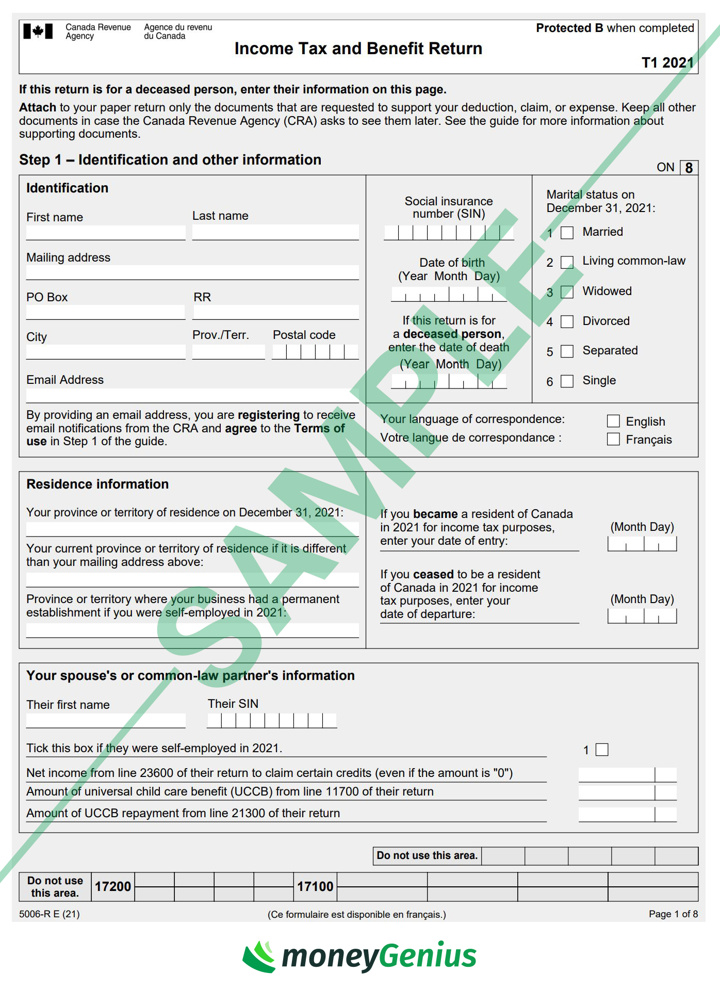
The remaining pages will all look similar to this first one. These extra pages are where you’ll fill in the information required from supporting documents (like your T4).
What to do if you make a mistake on your T1 General Form
If you make a mistake on your T1 General Form, you'll need to wait for your notice of assessment (NOA) before making corrections. Luckily, making the necessary adjustments is pretty simple.
There are a few easy ways to make changes to your T1 General once you have your NOA in hand. Simply choose the one that seems simple and straightforward for you:
- Your CRA My Account: Select the "Change My Return" service, and from there, choose whichever option applies to you. The CRA allows Canadians to make changes to any tax returns they've filed in the past 10 calendar years.
- ReFile: This is available through the NETFILE software used to file your return. You simply send your correction request and service providers make the adjustments. Note that you're allowed a maximum of nine changes/reassessments per tax year.
- Mail: Send a completed "Form T1-ADJ, T1 Adjustment Request" and all supporting documents to the CRA. Be sure to include your original assessment too.
FAQ
What is a T1 General Form?
The T1 General Form is an income tax document that lists your net and taxable income, deductions, tax credits, and balance owed. You can also use the form to show proof of income when applying for loans like a mortgage.
Where can I find a T1 General on the CRA website?
First, head to the CRA website’s T1 income tax package page and click on the province where you’re filing. Then, click on “Income Tax and Benefit Return” to download a pdf of the T1 form (and all other relevant forms).
Is proof of income the same as a T1 General?
They’re not quite the same. You can request a simple proof of income statement from the CRA website, which is a simplified form of your tax assessment. The T1 General form is a detailed tax document used to file your taxes.
Is T1 General the same as T4?
No, the T1 General isn't the same as a T4. Employers issue T4 slips – also called a Statement of Remuneration Paid – to show your employment income for the year. You use that information, along with income from other sources like self-employment and investments, when you fill out and file your T1 General form.
Who files a T1 General?
If you earn income during the year, you’re required to file a T1 General Form as part of filing your personal income taxes. This includes income from regular employment, self-employment, pensions, rental units, disability benefits, and more. You list this income in the "Total income" section of the T1 General.














































Leave a comment
Comments